
Documentation Index

Fetch the complete documentation index at: https://docs.autheo.com/llms.txt

Use this file to discover all available pages before exploring further.

The Activity page provides a complete, chronological log of all validator-related transactions for your connected wallet. Use it to audit your delegation history, track reward claims, and verify on-chain actions.

Transaction history table
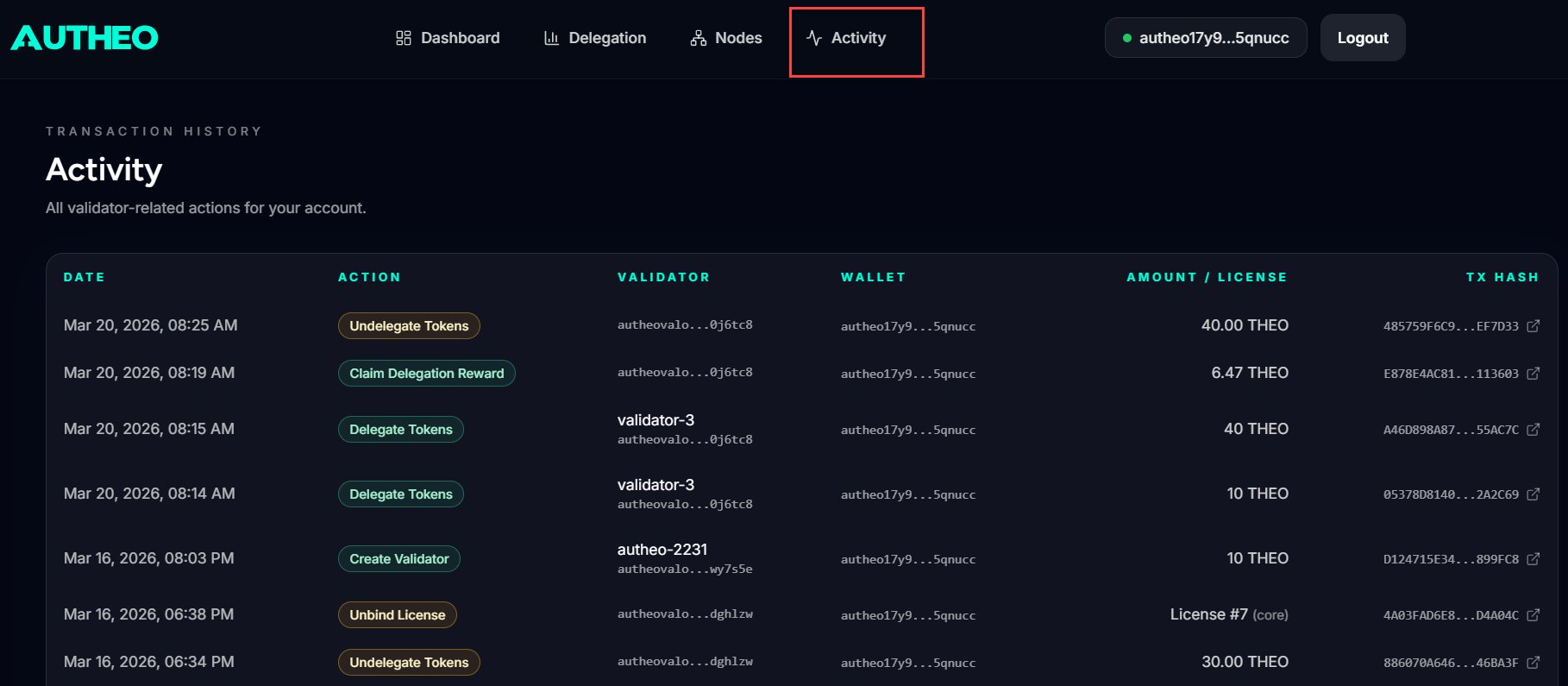
ColumnDescription
DateTimestamp of the transaction
ActionType of transaction (colour-coded)
ValidatorValidator name or address involved
WalletYour shortened wallet address
Amount / LicenseTransaction amount in THEO or the license ID involved
Tx HashClick to view the transaction on the Autheo Explorer

Action types

Actions are colour-coded in the table. Common action types include:
  • Delegate
  • Undelegate
  • Bind License
  • Unbind License
  • Claim Rewards
  • Create Validator

Refreshing your balance

After any transaction, click the refresh icon (↻) on the THEO Wallet Balance card on the Dashboard to update your displayed balance. The balance also updates automatically after wallet connection and after certain transactions complete.

License types reference

LicensePurposeHow it is used
SovereignDeploy and operate your own validator nodeUsed when deploying a node via the Deployment page
CoreParticipate in delegation pools through other validatorsBound to a validator delegation on the Nodes page
PrimePremium delegation pool participationBound to a validator delegation on the Nodes page
For on-chain license mechanics and state transitions, see License lifecycle.