

/referrals) allows you to generate a personal referral code and earn commissions whenever someone uses your code to purchase a node license.
How it works
- Buyers who use your code receive a discount on their purchase
- You (the referrer) earn a commission on that transaction
- Both percentages are set transparently by the Autheo smart contract (
AutheoCentralStore)
Generating your referral code
1
Navigate to the Referrals tab
Click the Referrals Code tab in the top navigation bar.
2
Generate your code
Click Generate Referral Code.
3
Confirm the transaction
Approve the on-chain transaction in your wallet. Gas fees apply. This registers your unique referral code on the
AutheoCentralStore contract.4
Copy and share your code
Once the transaction confirms, your unique code is displayed. Click Copy to copy it to your clipboard and share it with others.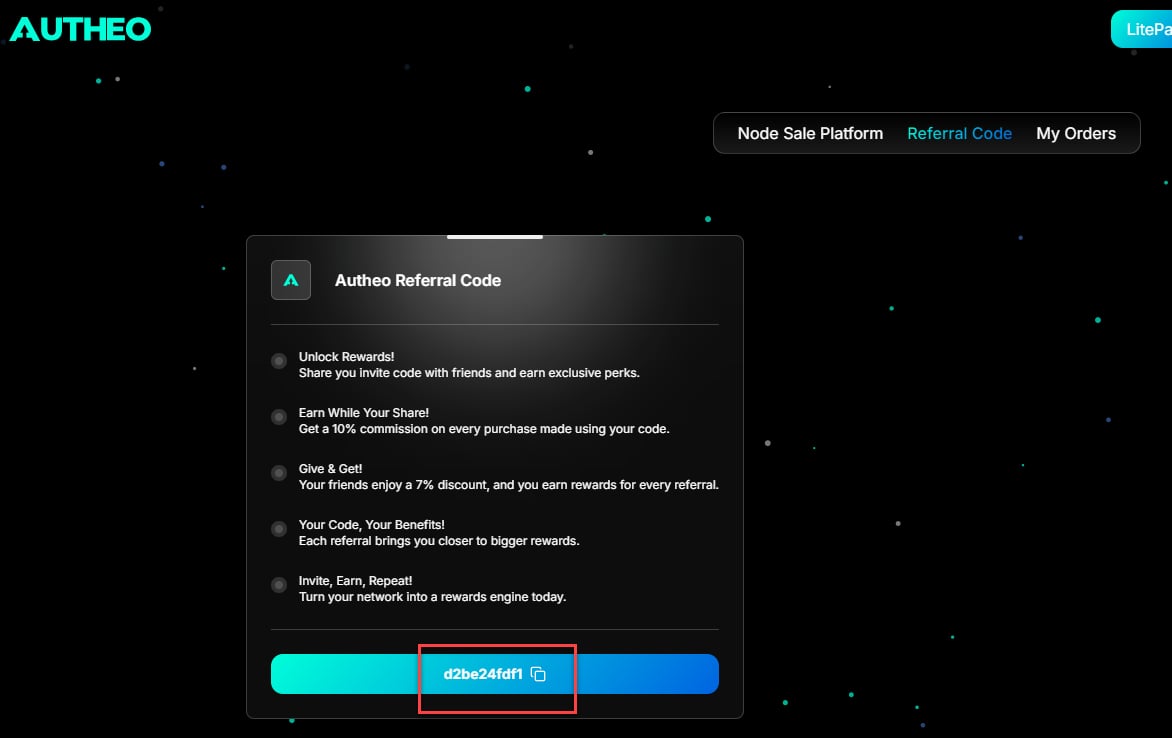
Referral card
The Referrals card displays:- Your unique referral code
- The commission percentage you earn on referred purchases
- The discount percentage buyers receive when using your code